
Spotify Web API
1편에서 노래 제목으로 곡을 검색할 때, Spotify Web API를 사용한다고 했었다.
https://developer.spotify.com/documentation/web-api/concepts/quota-modes
Quota modes | Spotify for Developers
Quota modes The quota mode refers to the mode in which an app can be: development mode or extended quota mode. You can check the current mode of your app by checking the App Status value in the App Settings: Development mode Newly-created apps begin in dev
developer.spotify.com
하지만 이 API는 최대 5명밖에 사용을 못 한다고 한다.
(심지어 수동으로 등록해줘야 함..)
참고로 Spotify Web API를 사용하려면 스포티파이 Premium 계정이 있어야 한다.
원래는 무료 계정으로 가능했지만 정책이 변경됐다고 한다.
나는 3개월 무료 Premium을 체험판을 사용했다.
그래서 혼자 로컬환경에서 개발할 때는 아무 문제가 안 되지만 배포 후에 사용자들이 요청하면 거절당할 것으로 예상된다.
원래는 이 API로 바로 곡 제목, 아티스트명, 앨범 표지를 받아오려고 했지만..
Cache-Aside 방식을 사용해기로 결정했다.
Cache-Aside란?
먼저 사용자의 데이터 요청이 백엔드 서버로 들어오면 DB에 데이터가 있는지 확인한다.
이때 있다면, 바로 그 데이터를 전달
만약 없다면, Spotifiy Web API로 데이터 받아오기 → DB에 저장 → 해당 데이터를 프런트로 전달
Rate Limit은?
외부 API를 사용할 때, 중요한 것 중 하나가 바로 이 Rate Limit(호출 제한 횟수)이다.
Spotify Web API의 경우 초당 몇 건 이하 이런 식으로 정해지지 않고, 스포티파이 자체에서 모니터링하며 유동적으로 관리한다.
따라서, 그냥 실패 시 일정시간 이후 재시도정도만 설정하면 될 것 같다.
사용해야 할 API
우리는 곡 제목, 아티스트명, 앨범 표지만 받아오면 되기에 1개의 API만 사용하면 된다.
https://developer.spotify.com/documentation/web-api/reference/search
Web API Reference | Spotify for Developers
Get Spotify catalog information about albums, artists, playlists, tracks, shows, episodes or audiobooks that match a keyword string. Audiobooks are only available within the US, UK, Canada, Ireland, New Zealand and Australia markets.
developer.spotify.com
바로 https://api.spotify.com/v1/search이다.
- 요청 예시
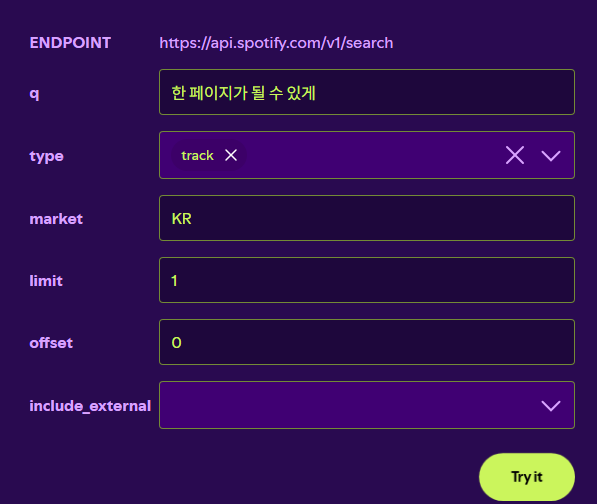
- q는 검색어로 이 프로젝트에선 곡 제목 or 가수 + 곡 제목 조합으로 입력될 예정이다.
- market은 검색할 노래를 어느 나라 기준으로 검색할 것인지에 대한 옵션이다.
국내곡을 검색할 것이라면 KR로 설정하면 된다. - limit와 offset은 페이징 처리 관련 값이다.
limit로 보여줄 데이터 수, offset으로 몇 번 데이터부터 보여줄지를 결정한다.
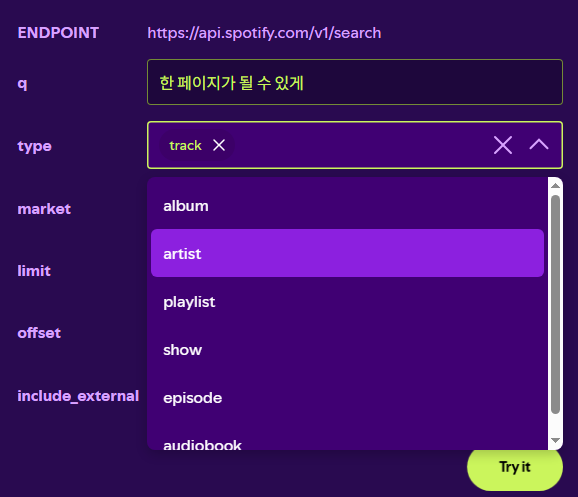
type으로 어떤 정보를 검색할 것인지를 결정한다. 여기선 곡 1개의 정보가 필요하기에 track으로 설정하면 된다.
- 응답 Body 예시
{
  "tracks": {
    "href": "https://api.spotify.com/v1/search?offset=0&limit=1&query=%ED%95%9C%20%ED%8E%98%EC%9D%B4%EC%A7%80%EA%B0%80%20%EB%90%A0%20%EC%88%98%20%EC%9E%88%EA%B2%8C&type=track&market=KR&locale=ko-KR,ko;q%3D0.9,en-US;q%3D0.8,en;q%3D0.7",
    "limit": 1,
    "next": null,
    "offset": 0,
    "previous": null,
    "total": 1,
    "items": [
      {
        "album": {
          "album_type": "single",
          "total_tracks": 6,
          "external_urls": {
            "spotify": "https://open.spotify.com/album/6mAKMlMj09Vsdk05zkQ2MG"
          },
          "href": "https://api.spotify.com/v1/albums/6mAKMlMj09Vsdk05zkQ2MG",
          "id": "6mAKMlMj09Vsdk05zkQ2MG",
          "images": [
            {
              "url": "https://i.scdn.co/image/ab67616d0000b2738d5ebc3ff7acf1319a218a77",
              "height": 640,
              "width": 640
            },
            {
              "url": "https://i.scdn.co/image/ab67616d00001e028d5ebc3ff7acf1319a218a77",
              "height": 300,
              "width": 300
            },
            {
              "url": "https://i.scdn.co/image/ab67616d000048518d5ebc3ff7acf1319a218a77",
              "height": 64,
              "width": 64
            }
          ],
          "name": "The Book of Us : Gravity",
          "release_date": "2019-07-15",
          "release_date_precision": "day",
          "type": "album",
          "uri": "spotify:album:6mAKMlMj09Vsdk05zkQ2MG",
          "artists": [
            {
              "external_urls": {
                "spotify": "https://open.spotify.com/artist/5TnQc2N1iKlFjYD7CPGvFc"
              },
              "href": "https://api.spotify.com/v1/artists/5TnQc2N1iKlFjYD7CPGvFc",
              "id": "5TnQc2N1iKlFjYD7CPGvFc",
              "name": "DAY6",
              "type": "artist",
              "uri": "spotify:artist:5TnQc2N1iKlFjYD7CPGvFc"
            }
          ],
          "is_playable": true
        },
        "artists": [
          {
            "external_urls": {
              "spotify": "https://open.spotify.com/artist/5TnQc2N1iKlFjYD7CPGvFc"
            },
            "href": "https://api.spotify.com/v1/artists/5TnQc2N1iKlFjYD7CPGvFc",
            "id": "5TnQc2N1iKlFjYD7CPGvFc",
            "name": "DAY6",
            "type": "artist",
            "uri": "spotify:artist:5TnQc2N1iKlFjYD7CPGvFc"
          }
        ],
        "disc_number": 1,
        "duration_ms": 205575,
        "explicit": false,
        "external_ids": {
          "isrc": "US5TA1900062"
        },
        "external_urls": {
          "spotify": "https://open.spotify.com/track/0EhdXt3y460mTRsi97Pyk5"
        },
        "href": "https://api.spotify.com/v1/tracks/0EhdXt3y460mTRsi97Pyk5",
        "id": "0EhdXt3y460mTRsi97Pyk5",
        "is_playable": true,
        "name": "한 페이지가 될 수 있게 Time of Our Life",
        "popularity": 59,
        "preview_url": null,
        "track_number": 2,
        "type": "track",
        "uri": "spotify:track:0EhdXt3y460mTRsi97Pyk5",
        "is_local": false
      }
    ]
  }
}
딱 1개의 데이터를 조회하는데도 정말 많은 데이터들이 포함되는데
우리는 tracks.items에서 0번째 인덱스의 총 4개의 값만 가져오면 된다.
- 곡 제목 (Title)
- JSON 경로: tracks.items[0].name
- 실제 데이터: "한 페이지가 될 수 있게 Time of Our Life"
- 아티스트명 (Artist)
- JSON 경로: tracks.items[0].artists[0].name
- 실제 데이터: "DAY6"
- 앨범 표지 이미지 URL (Album Image) :
tracks.items[0].album.images 배열에 크기별로 3개가 들어있는데,
리스트나 카드 UI에 적당한 300x300 크기인 1번 인덱스를 사용할 것이다.- JSON 경로: tracks.items[0].album.images[1].url
- 실제 데이터: "https://i.scdn.co/image/ab67616d00001e028d5ebc3ff7acf1319a218a77"
- 스포티파이 고유 트랙 ID :
나중에 우리 DB에 이 곡이 이미 저장되어 있는지 조회할 때 쓸 기준 키(Key)다.- JSON 경로: tracks.items[0].id
- 실제 데이터: "0EhdXt3y460mTRsi97Pyk5"
다음 3편에서는 API 명세서 작성, DB 테이블 작성을 해보자.
'개인 프로젝트' 카테고리의 다른 글
| [Spotify Web API 4편] MSA 프로젝트 초기 세팅 (0) | 2026.06.07 |
|---|---|
| [Spotify Web API 3편] 애그리거트 경계 설정 및 SA 문서 작성 (0) | 2026.06.06 |
| [Spotify Web API 1편] 주제 및 기능 설계 (0) | 2026.06.05 |
| [Riot API 4편] LoL 전적 조회 – Service/Controller 구현 (0) | 2025.10.30 |
| [Riot API 3편] 롤 전적 DTO 설계하기 (0) | 2025.10.30 |